
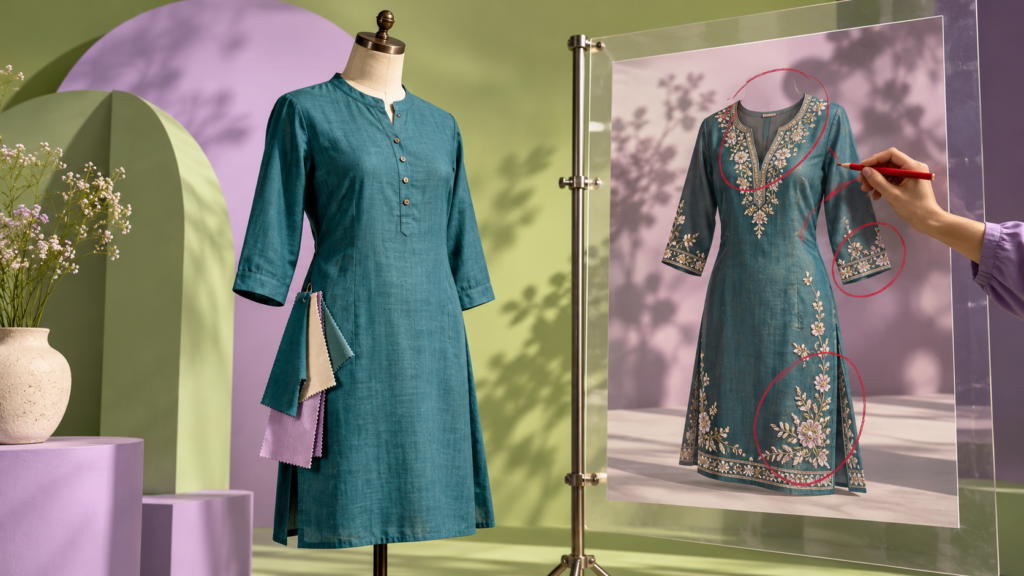
Imagine a Bangladeshi clothing brand promoting a new blue Kurti. Its AI-generated ad looks beautiful: perfect lighting, an elegant model, and a polished background. Then a customer notices that the Kurti in the ad has embroidery and a neckline that the real product does not have.
The design may attract a click. It may also create a disappointed customer.
That is the challenge for AI-assisted graphic design. Speed and visual appeal are useful, but an ad must also show the product honestly, sound like the brand, and give people a reason to trust what they see.
The issue is timely. In Canva’s 2026 State of Marketing & AI research, 70% of surveyed consumers said they could usually spot AI-generated ads because something felt missing. At the same time, 68% said they did not mind AI in advertising when it made ads more helpful or relevant. The survey covered seven countries, not Bangladesh, so these figures are context rather than a measure of local consumer opinion. The practical lesson remains useful: an ad has to serve its audience, regardless of how it was made.
What makes an AI ad feel untrustworthy?
An ad can feel wrong for reasons that have little to do with whether the image was generated. The product may look different from the item on sale. A model may wear a garment that does not exist. The Bangla text may be awkward. A “limited offer” may have no confirmed end date. Or the brand’s colours and tone may disappear behind a generic, glossy style.
A designer’s job is to catch those gaps before the customer does. Here are five checks that help.
1. Check the product against reality
For a product ad, start with approved product photos and the actual specifications. Compare the design with the item customers will receive: colour, fabric appearance, shape, stitching, buttons, packaging, and accessories.
AI can help make a background, explore a scene, or suggest a layout. But if it invents a pocket or changes a pattern, the ad needs correction. When a visual is a concept rather than a photo of the real product, make that clear to viewers. A small disclaimer does not make an inaccurate product claim acceptable.
A useful rule: if a customer could reasonably expect a detail in the image to arrive with the order, verify that detail.
2. Give every claim a source
AI is quick to suggest attractive copy: “premium quality,” “100% cotton,” “best price,” or “delivery anywhere in Bangladesh.” Each phrase should be checked against information the business has approved.
Before placing a claim on the design, ask: Who can confirm this? If the fabric composition, discount, stock status, delivery area, or return policy is uncertain, leave it out until the business verifies it.
This is a simple “proof before pixels” habit. Designers do not need to become product inspectors, but they do need to know which facts are confirmed and which are placeholders.
3. Edit Bangla and English with a human eye
Text generated inside an image can be misspelled, distorted, or inconsistent. For a Bangladesh-facing campaign, the details matter: Bangla spelling, currency, phone number, address, and the way the brand speaks to customers.
Write final copy as editable text in the design file. Ask a fluent reviewer to check the Bangla, and read the English for clarity. Keep prices and offer dates easy to verify. A beautiful image cannot rescue confusing information.
4. Keep the brand recognisable
If a clothing brand is known for simple, natural photography, a futuristic neon campaign may draw attention but feel unrelated to everything else the brand publishes.
Choose a visual direction that fits the brand’s products, colours, type, and audience. Local relevance should come from real customer needs and context, not decorative clichés. A Dhaka shopper checking a Facebook or Instagram post may want to know what the garment actually looks like, which sizes are available, and where to see more details.
AI can offer many variations. The designer decides which one belongs to this brand.
5. Test the ad on a phone before publishing
Many social ads are first seen as small images on a phone. Zoom your design out to roughly the size it will appear in a feed. Can someone identify the product, read the main message, and understand the next step within a few seconds?
Give the design one clear message. Make the product visible, keep type readable, and use a call to action that matches the real destination, such as “Explore the collection” if the collection page is live. Check the final link as carefully as the visual.
A quick example: one ad, two outcomes
Return to the fictional blue kurti. An early AI concept shows an elegant model in an invented version of the garment, with the line “Pure linen, 40% off, delivery everywhere.” None of those details came from the product brief.
A trustworthy version starts with a photograph of the actual Kurti. AI helps explore a subtle background and alternative compositions. The designer keeps the brand’s type and colours, adds a verified headline such as “New arrivals: explore colors and sizes”, and checks that the product page really contains those choices. If the brand uses an AI-generated scene or model, it reviews whether customers could mistake the illustration for an exact product photo and presents it accordingly.
The second ad is still creative. It simply makes fewer promises it cannot keep.
Try this on your next design brief
Use this prompt to explore directions, then review the outputs yourself:
Suggest three mobile-first social ad concepts for a Bangladeshi clothing brand selling [actual product]. Use the approved product photo and these brand colours: [colours]. Leave room for an editable Bangla or English headline, the real logo, and one clear call to action. Do not invent product features, prices, discounts, delivery promises, or customer reviews. List every detail the brand must verify before publishing.
A prompt can set boundaries, but it cannot guarantee that an image generator will follow them. Compare each result with the brief, make corrections in your design tool, and get the business owner’s approval for factual claims.
The design skill behind the AI tool
The most valuable part of AI-powered design is the judgement around it: understanding the product, choosing a direction, editing the layout, and deciding what is ready to show customers. That is what turns a fast visual into an ad a brand can stand behind.
If you want to practice those skills, explore Transfotech Global Bangladesh’s AI Powered Graphics Design program. The course combines design foundations, Photoshop and Illustrator, AI-assisted image work, branding, and social media projects. Its course page also outlines portfolio review, mock interviews, and job referral support; relevant internship opportunities may be available through sister concerns. Check the page of Transfotech Global Bangladesh for the latest batch details.
Before your next ad goes live, ask one final question: Does this design show what the customer will actually get?