

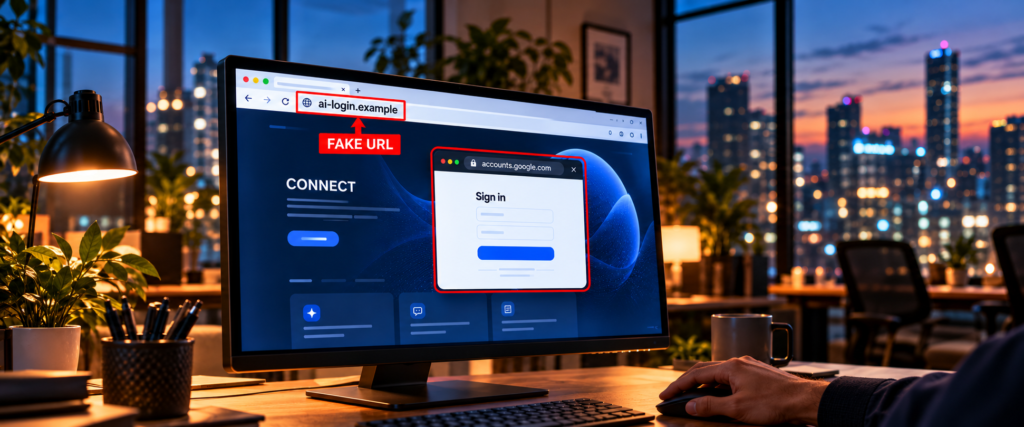
Imagine you manage online ads for a small business in Dhaka. An email offers a new AI tool that can review your campaigns. The page looks polished, displays a familiar AI logo and asks you to “Connect with Google.” A Google sign-in window appears. Even its address bar seems to say accounts.google.com.
Would you enter your password?
In one type of scam, that convincing window is part of the page you are already viewing. The address at the top of your actual browser still belongs to an unrelated website. The sign-in form was drawn by the scammer to collect what you type.
You do not need to be a cybersecurity specialist to catch this. You need to know where to look.
Why are scammers copying AI tools?
Students use AI for study and research. Designers use it to explore ideas. Professionals use it to draft emails, analyse information and plan campaigns. A message promising a useful new feature can therefore feel relevant to almost anyone.
In October 2026, security researchers at Island documented fake AI advertising products impersonating familiar names, including ChatGPT, Claude and Gemini. The pages invited people to connect business accounts, then displayed imitation sign-in windows to capture passwords and verification codes. That particular investigation focused on advertising users; it did not establish that the same campaign had targeted people in Bangladesh.
The wider risk is relevant here. BGD e-GOV CIRT has warned that fake AI branding can be used for phishing – tricking people into sharing private information – payment fraud and harmful downloads. It explained why those tactics could affect Bangladeshi users. The warning is about criminals impersonating AI services, not evidence that the real services have been hacked.
The trick: a browser window inside a browser window
Normally, when you sign in to a service, your browser shows the site you are visiting in its own address bar. A fake page can draw what looks like a second browser window, complete with a Google logo, a lock symbol and a familiar address. Security researchers call this a browser-in-the-browser attack.
Here is the simple test:
Your real browser address bar shows
example.com/ai-offer. A sign-in box drawn inside the page saysaccounts.google.com. Which site are you actually on? You are still onexample.com. Do not enter your password in that box.
The small address bar inside the page is only a picture of an address bar. On a phone, where the browser controls may be less visible, the safest move is to close the link and open the service through a bookmark or an official address you already know.
This does not mean every “Sign in with Google” prompt is fraudulent. It means a familiar-looking prompt is not enough to prove that the surrounding website or the access it requests is trustworthy.
Three invitations worth checking twice
- “Your AI subscription will expire unless you update your card.” Microsoft observed a ChatGPT-themed payment message that led to a page collecting personal and card details. Open your account independently to check billing; do not use the urgent message’s button.
- “Connect your Google or business account to unlock a new AI feature.” In Island’s investigation, fake AI advertising tools used this promise to bring users to imitation sign-in windows. Verify that the product actually exists on the provider’s official website. Even when a real sign-in page opens, read the account permissions before approving a new connection.
- “Download the free AI plugin or latest model here.” Microsoft has also documented AI-themed ads and fake downloads used to deliver malware, or harmful software. Do not install a file from an unfamiliar ad, message or download page simply because it displays a well-known AI logo.
Notice the pattern: each invitation offers a useful result, then asks for something valuable first – your password, verification code, payment details, account access or a download.
A one-minute safety check before you click “Connect”
Check the real address bar. Look at the browser’s own address field, outside the website content. Read the full domain carefully. A brand name elsewhere on the page, or a lock symbol alone, does not establish that the site is genuine. The FTC notes that HTTPS means a connection is encrypted, not that a website is legitimate.
Find the offer yourself. Close the message or ad. Open the AI provider from a bookmark or type its known official website into a fresh browser tab. Look for the claimed feature, billing notice or account alert there. If you cannot verify it, pause.
Ask what access the tool needs. A writing assistant has no obvious reason to control your advertising account. If a new integration requests access to your email, files or ad budget, check with your organisation’s IT or account owner before approving it.
Treat unexpected verification prompts as a warning. Do not type a one-time code into a page you have not verified or approve a sign-in request you did not start. Two-step verification helps, but a convincing fake page can ask for a code while an attacker attempts to use it in real time. Where available, passkeys let you sign in using your device and offer stronger protection against a fake website asking for a reusable password or code.
What if you already entered your details?
Act quickly, and use the real service’s website to do it:
- Password entered: Change it immediately. Change it anywhere else you reused it, then review recent account activity, connected apps and signed-in devices. Google’s account recovery guide explains these checks for Google accounts.
- Verification code entered or sign-in approved: Secure the account and review active sessions and unfamiliar access. If it is a work or advertising account, inform your IT or account administrator promptly so they can check for changes.
- Card details entered: Contact your bank or card issuer immediately using its official number or app. Ask them to review and protect the card.
- File installed: Stop using that device for sensitive sign-ins until you have run an updated security scan or sought trusted IT help. The FTC’s malware guidance explains the next steps.
If you only opened a suspicious page and entered nothing, close it. You can still report the link to the platform or your organisation’s security team so others do not receive it.
The lesson to remember
A convincing logo tells you what a page claims to be. Your browser’s real address bar, an independently verified official site and a careful look at requested permissions tell you much more.
The next time an AI tool offers to save you time, take one minute to verify it before you connect an account. That small pause may protect your email, your files and even your company’s ad budget. For more everyday security habits, read our guide to cybersecurity in Bangladesh.
Want to understand how these attacks work and how defenders respond? Explore Transfotech Global Bangladesh’s AI-Powered Cybersecurity program.